

Review – Chauvet 4PLAY LED Moonflower
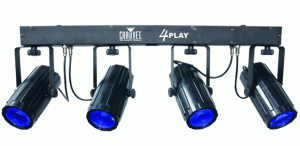
The Chauvet 4PLAY is a great value for the Mobile DJ. It’s a light bar with 4-moonflower fixtures. Each light contains Red, Blue, Green and White LED’s. The light comes with a nylon carry case. It is not the most robust nylon case you’ve ever seen and the zipper is particularly finicky but it is better than nothing. It is recommended that you handle the zipper with great care and be sure to go slow and don’t force it if it begins to hang up on you.

The light itself is quite bright and versatile. It can be used in DMX mode, sound activated mode or auto mode. The audio sensitivity adjustment was a little finicky for me… I could never seem to get it just right. Auto mode is good. In auto mode the light just cycles through a pre-programmed series of patterns and colors.
There is an additional power outlet on the light bar that enables you to daisy chain something else off the fixture, maybe another light. I thought the power cord was too short. With the light at a reasonable 7 feet up on a stand, the cord does not even come close to reaching the floor. You end up having to hook an extension cord up to it that doesn’t look nice. I bought a 25 foot power cord to replace the one that comes with the 4PLAY.
Overall a big thumbs-up from Digital DJ Equipment. It’s a great light for spicing up your dance floor. I’d happily pay a little more though for a bit higher quality though. For instance, the strain relief on the lights themselves are very cheesy. They actually provide no strain relief whatsoever as the cable is too thin to even be gripped by the strain relief. But that is about my only gripe with this light.
PROS:
Great value.
Bright.
DMX controllable.
Auto mode makes for quick setup and instant gratification.
CONS:
Strain relief on light fixture plugs is ineffective.
Plastic knobs are not very durable.
Nylon carry case is very flimsy and zipper require great care in using.
Review – RHA MA-350 earphones
The RHA MA-350
The earpiece is machined aluminum that has a low profile. The low profile makes these comfortable to wear while flying or laying down since they fit so closely to the ear, they do not affect your ability to rest your head on a seat back or pillow.
There are 3 sizes of silicone tips to enable you to find just the fit. I found these to be very comfortable in the ear and since they fit in the ear canal, they “isolate” the sound very well, preventing ambient noise from coming your ear, and just as importantly, preventing the sound in your ear to disturb people near you.
The braided cloth cable reduces cord tangling and reducing cable noise in your ears that can occur with plastic cables as they move over clothing.
The bass response is excellent. It’s not a muddy bass either but quite well defined and balanced pretty well with mid and high frequencies. Of course you can also customize the sound by using the equalizer on your device if you wish.
Reid and Heath has a great product here. You will be hard-pressed to find a better sounding earphone at this price point and I feel the sound and build quality of the MA-350 rivals that of earphone costing much more.
Review of the Electro-Voice ELX112P Live X Two-Way Powered Loudspeaker
Electro-Voice ELX112P 12″ Live X Two-Way Powered Loudspeaker
I have owned the ELX112P speakers for about a month and have used them at 6 events. I feel I’ve used them enough to present my review of them and I do have mixed feelings about these speakers.
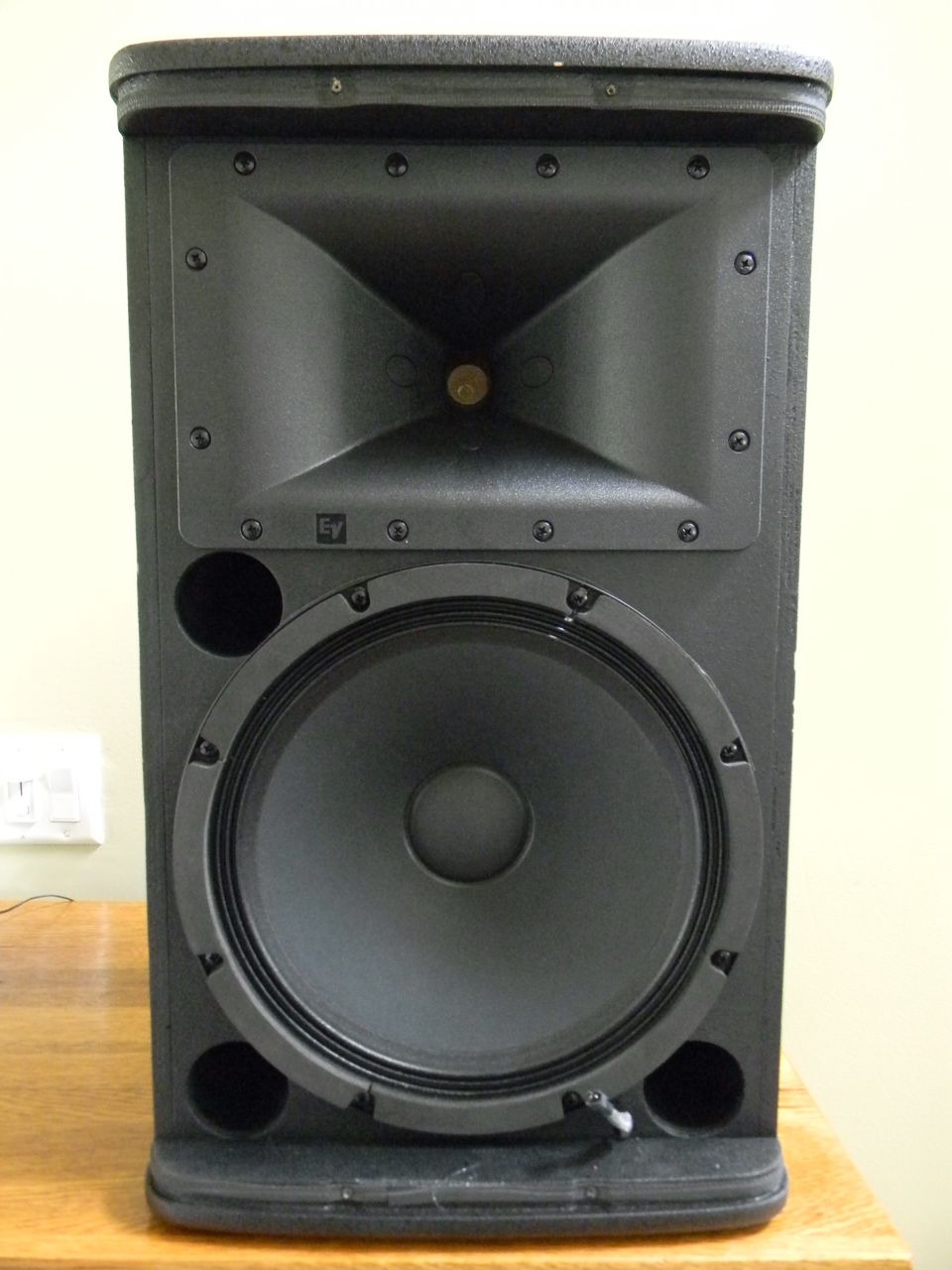 Let’s heap some praise on the speakers first. I looked at quite a few speakers before deciding on the ELX112P’s. The most direct competitor in my opinion is the Mackie SRM450V2 12″ 2-way Compact SR Loudspeaker BLACK (Single Speaker).
I did some A-B comparisons between the ELX112P and the SRM450v2 and can tell you that the EV offered a clearly superior sound. Much more clarity in the mid’s and high’s and punchy bass that moves some air. It was not a fair comparison… I felt the EV’s were heads and shoulders above the Mackie’s… except in the road-worthiness department. The Mackie’s win that one.
The amount of bass that comes out these speakers is nothing short of amazing particularly when you realize it is only a 12″ ported woofer providing all that bass. The amplifier provides ample power to enable this speaker to achieve a sound pressure level that will satisfy just about anyone. I’ve never seen the peak limit LED light up yet and I’ve used these at a number of events where they were really cranking.
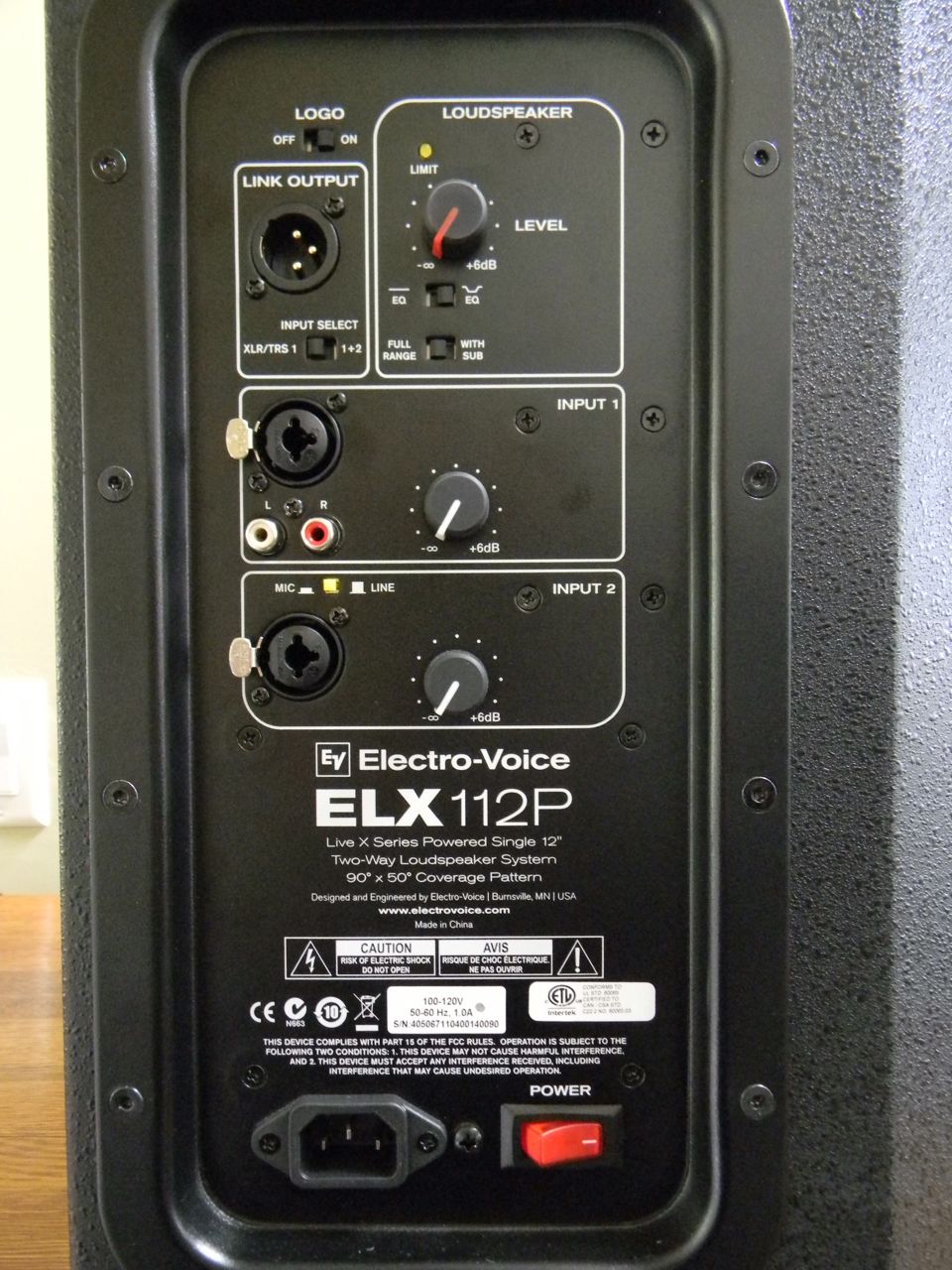 The back panel offers a very flexible number of inputs. Both Input 1 and Input 2 feature XLR/TRS combo inputs, each with a gain adjustment. Input 1 provides an additional choice of RCA inputs which means you can attach any sort of line level device to that such as an MP3 player. Input 2 can be switched between a Mic or Line level input. So with an MP3 player hooked up to Input 1 and a Microphone hooked up to Input 2, you’re able to provide music and the ability to make announcements with a single speaker, no mixer necessary. That’s awesome.
The back panel also gives you a normal/boost switch as well as switch to enable a 100hz high pass filter if you intend to use these with a sub-woofer.
There is also an XLR parallel output to chain this to another ELX112P. Curiously, if you use the RCA input, it is not passed through the XLR output.
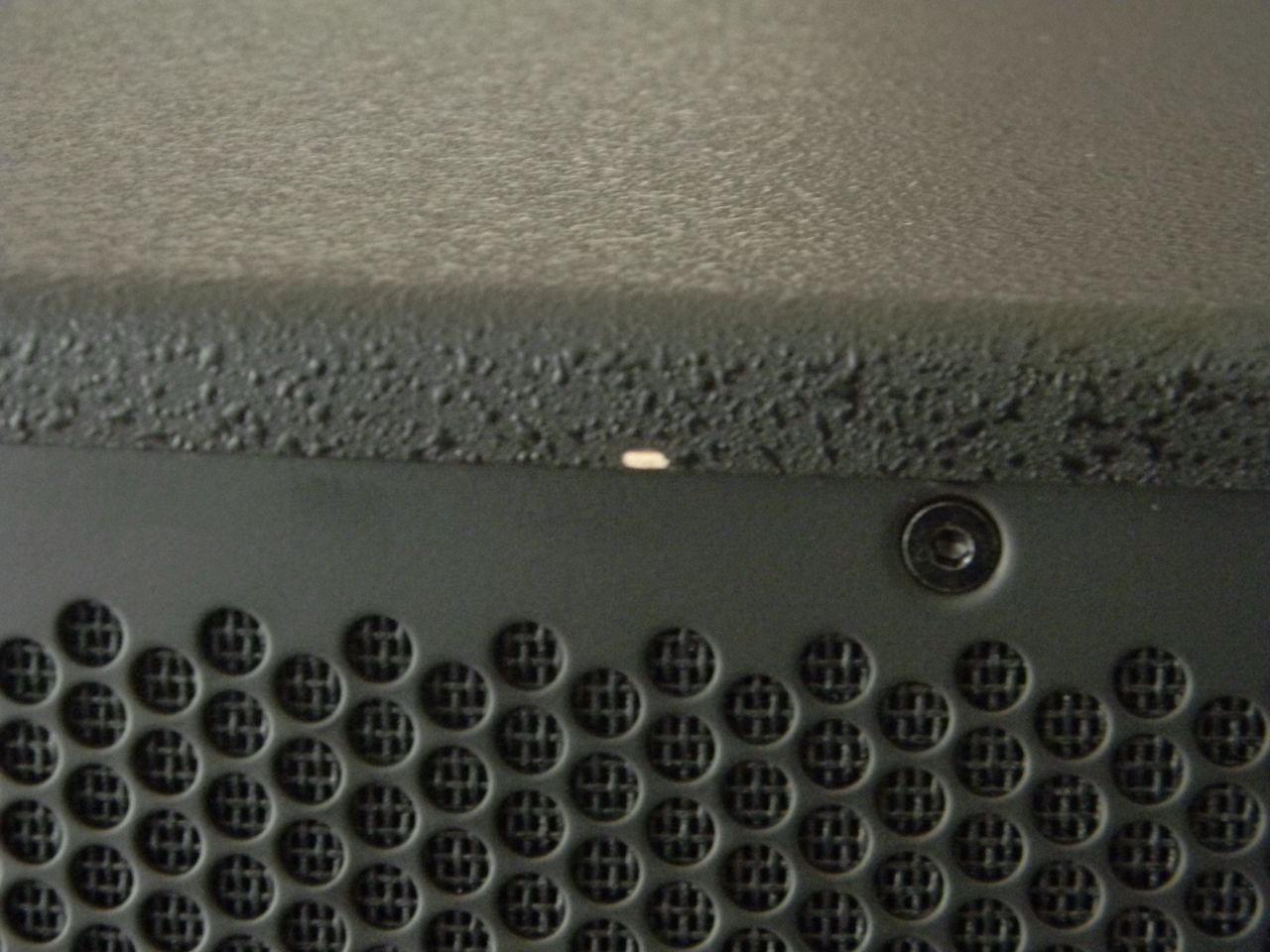 The plywood enclosure is one contributing reason that the bass sounds so good. You can develop a resonance in an enclosure with wood that just isn’t the same as with plastic enclosures. But when you factor in the way this enclosure was designed, with its wrap around metal grill and sharp angles on the edges of the enclosure, you can immediately get the sense that good looking doesn’t equate to road-worthiness. I’ve not only got speaker covers for my ELX112P’s, I handle them with great care when loading-in or transporting in my vehicle. In spite of the great care I take, I’ve already got a ding in the top front of one of the speakers. I’m not looking forward to what’s going to happen when I bang into a metal doorway frame one of these days.
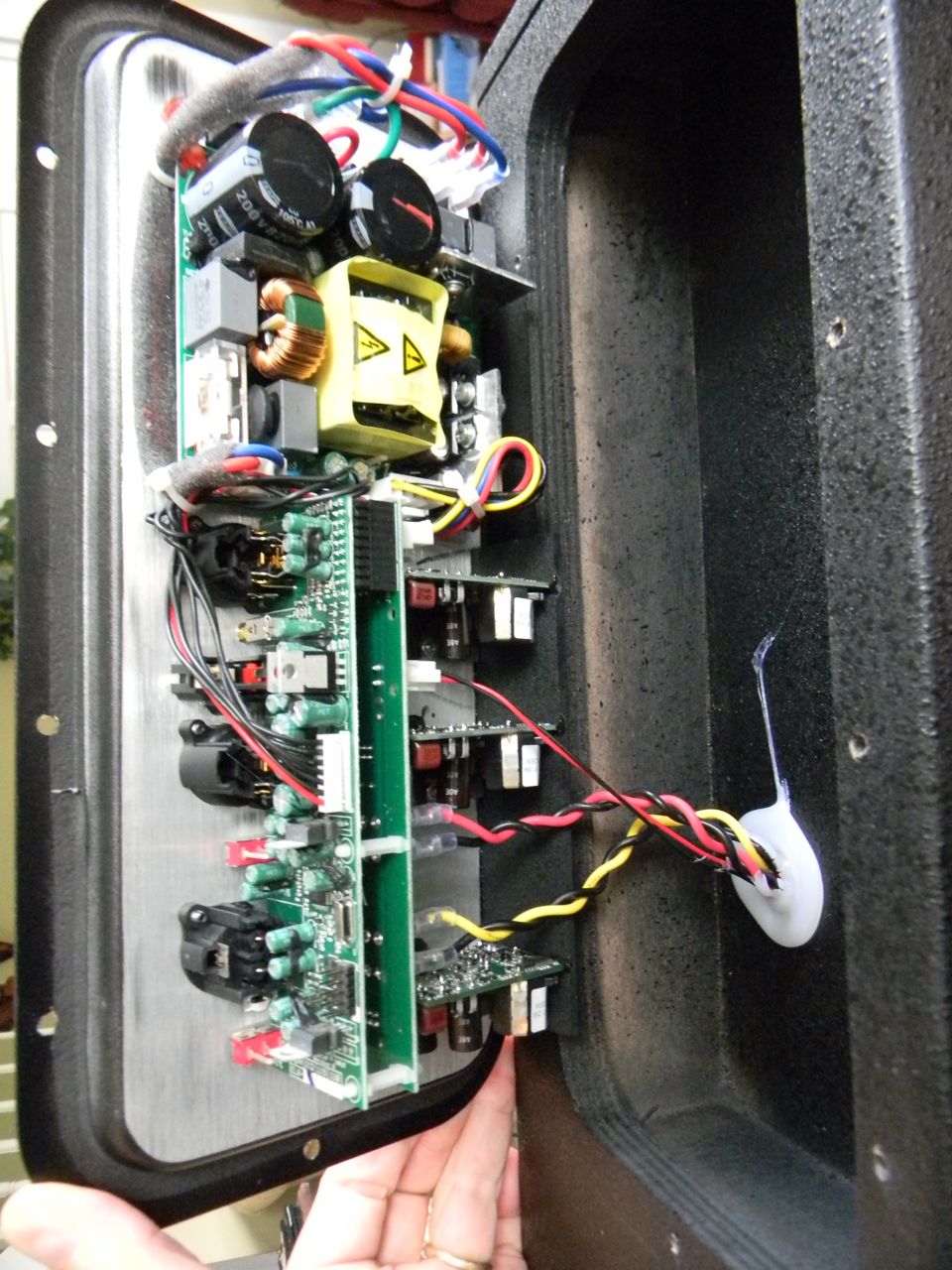 So how large do you think a 1000 watt amplifier should be? How heavy should it be? You might be quite surprised at how small the amplifier that is in the ELX112P actually is. I removed the screws of the back panel to take a look-see and here is what I found. Amazing how small it is right? If you click on the photo, it will get much larger to enable you to see it better.
So bottom line is that EV has produced a speaker that has a very attractive price point. The sound quality does not disappoint and the speaker can really crank. However EV really dropped the ball in the overall design of the enclosure resulting in a speaker that will get severely banged up unless you use an exceedingly great amount of care in handling and transporting them. If appearance after getting banged around is not a concern of yours, then you can consider these a 5-star speaker based on sound quality alone.
I am knocking them down to 4-stars because I feel that road-worthiness is a must-have for a speaker that is marketed to DJ”s and bands who will be loading these in and out of vehicles all the time and sliding them on stages and who knows what else. EV, you saved some money in building these in China, but maybe you should have put a little more thought into the enclosure itself. I definitely feel that a wrap-around grill cover is a poor design choice as well as the orientation of the carry handle.
Here is my video review of the ELX112P
Aphex Exciter review
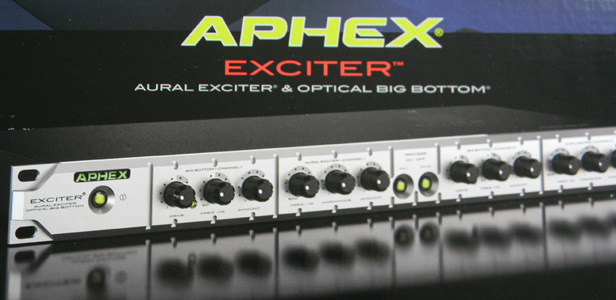 The Aphex Exciter is the latest in the line of Aural Exciters produced by Aphex. Compared to the model 204, this model makes further advances in how it operates resulting a lot of bang for the buck. Properly used, this device can significantly improve the sound of lesser quality speakers and of vinyl records. You may also find that mp3’s and CD’s will have enhanced clarity and presence of the mid and high frequencies as well as more punch in the bass.
The Aphex Exciter (2ch Aural Exciter & Big Bottom)
What is the best way to rip CD’s? – Part 1
The topic of encoding music for use in your digital devices can be quite intimidating. Rightly so since there are many audio file formats and so many variants. Here are a few of the better known formats; MP3, FLAC, OGG, APE, AAC, WAV, ALAC, lossless, lossy, compressed, and uncompressed. Throw in sample rate, sample size, bit rates (average bit rate, constant bit rate, variable bit rate) and consider that that not all devices and software will recognize all formats, you can quickly find yourself overwhelmed with the choices.
Hopefully this series of articles will begin to untangle, demystify and clarify the important decisions you’ll be making as you begin to encode your CD’s for use in your digital life.
Let’s take a look at the big picture.
 The digital bits that comprise the music on an Audio CD are by nature in an uncompressed format. They are not being compromised in any way during the process of being played other than the digital to analog conversion (DAC) that takes place in your audio equipment so that your speakers are able to produce the sound that you hear. But the downside to this uncompressed music is that it takes up a lot of space. If you are just playing a CD on a CD player, it is irrelevant how much space is used. The issue of space and sound quality only rears it’s ugly head when you begin to transfer what is on the CD to a digital file that will reside on a hard disk, USB drive, iPod or any other digital music player.
The MPMan F10, one of the first MP3 players
When digital music players first came on the scene around 1998, the amount of memory for the music they would be playing was tiny by today’s standards.One of the very first players, the MPMan F10 manufactured by Korea’s Saehan Information Systems, cost about $250 and only had 32MB of flash memory which would not have been able to hold even a single file of uncompressed music in WAV or AIFF format (more on formats later.) Compare that to digital music players today that could have up to 24GB or more of flash memory storage. Obviously there was going to have to be a way to reduce file sizes of the music in order to be able to have a larger amount of music on your digital music player of yesteryear.
The MP3 format was developed as a means to significantly reduce the size of music files. At 128kbps, a MP3 is roughly 10 times smaller than the original uncompressed file. In other words a 40MB uncompressed music file could be reduced to just 4 MB in size once it has been converted to a 128kbps MP3.  However there was a downside to this reduction in file size, namely, loss of fidelity. The concept behind the MP3 format is that it removes some of the music information in order to achieve the reduction in file size. Algorithms were developed that would analyze the music then make educated guesses about what data to discard in order to make the file size smaller. The idea was to throw out music information that would not be “noticed” by the listener. It’s really just a sleight-of-hand trick that achieves the smaller file sizes while providing a “good enough for most” sound quality. The problem is that many audiophiles did notice the reduction in sound quality and will have nothing to do with MP3 music at all. An excellent article on MP3 sound quality can be found at http://www.stereophile.com/features/308mp3cd.
Essentially there are three types of audio file formats; uncompressed, lossless and lossy. WAV and AIFF are two examples of an uncompressed format. FLAC and ALAC are examples of a compressed but lossless audio file format while MP3 and AAC are examples of compressed, lossy audio file formats.
The next in this series of articles will discuss in more detail the differences, pros and cons of the various audio file formats.
Numark DDS80 Review
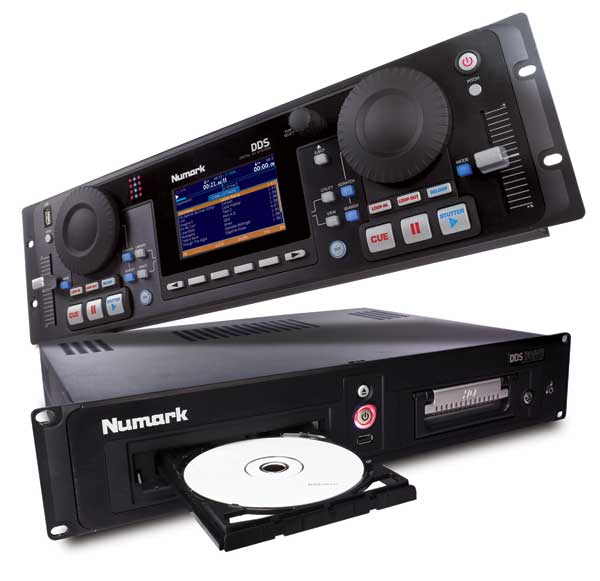
DDS80
 is a rack-mountable system of two pieces: a digital controller and an additional unit housing a DVD-ROM and 80GB hard drive.
What was appealing to me about this unit is that it was advertised as being “Future Proof” and able to accommodate a variety of music sources whether it be from external hard drive, USB flash drive, iPod, laptop, etc. The DDS controller has 3 USB ports which enable you to hook up, in theory, 3 additional music sources. In practice however, you will probably only have a single port available to you for additional music source since one port will be needed by the DVD-ROM/80GB hard drive unit, another port will be needed by the provided keyboard. This leaves only one more port available. To get around this limitation, you could of course use a powered USB hub to provide more ports, but this increases the odds of connection issues or problems, requires another power adapter in your setup (the DDS has it’s own plug and the DVD-ROM/hard drive unit also has it’s own power supply and plug). So before you know it, you’ve got power cords, power supplies and RCA cables to manage.
The DVD-ROM/hard drive unit also has a single USB port on the face of the unit, just below the power button.
The DDS80 has two of the USB ports located rather inconveniently on the back (Numark calls it the “front” of the unit in the description of the DDS80 but refers to it as the “back panel” in the documentation. Confusing? Yes it is? And misleading. If you intend to use flash drives as your primary source of music as I have chosen, this restricts the way in which you can place the controller in your equipment rack. For instance, if you prefer to have your mixer above the controller, then you will not be able to easily access the two USB ports on the back of the DDS controller. That menas you must have the DDS80 be above the mixer to enable easy access to the USB ports and that is not how I would prefer to have it be arranged. The DDS has the third USB port on the top left corner of the unit. I don’t find this particularly good placement either because if you have a flash drive plugged into that port, you end up having it sticking straight up, likely with a bright LED activity light on the flash drive blinking away all night long. It is very easy to bump it while working and most troublesome is its placement immediately adjacent to the jog/scratch wheel. It really gets in the way particularly when you are aggressively manipulating the jog/scratch wheel.. You could work around this somewhat by using a USB extension cable or the previously mentioned powered USB hub but that is not ideal.
The controls of the DDS80 will be familiar to most DJ’s. I actually am glad that Numark didn’t fill this device with a bunch of mostly useless special effects functions. What is included works well: pitch-shift (up to 25% and down to 100%), key lock, scratch, loop and really fast track lookup. For me, the key lock feature is incredibly useful. You can speed up a song without the key of the music changing and that means no more “chipmunks” vocals. You do have to use some discretion with this though because if you pitch a song down more than about 10% you start to get objectionable digital garbling. PItching up is more forgiving and the digital distortion is not nearly so noticeable. This is not a problem with the Numark, it is inherent in digital playback.
The scratch function works surprisingly well and if that’s you’re style, you will find it useful. The scratch wheel is not weighted though so it may or may not have the right “feel” for you.
At first glance a big disappointment for me was the loop function. You are limited to a single loop “in point” and it took a while for me to figure out how to micro-adjust the loop in and out points. Your first instinct is just to start the song and then hit the Loop In button at the point you want to start your loop and then hit the Loop Out button where you want to loop to end. This method is not all that accurate though. It’s all too easy to be a fraction of a beat off and that of course makes the loop sound terrible. But the secret is to pause the deck once you get to you the point where you’d like to start the loop, then use the jog wheel to get precisely where you want to be. Then hit your Loop In button. Start the song again using the play button and pause the song just about where you want the loop out point to be, then use the jog wheel to get to the precise out point and then hit the Loop Out button. This way you can get your loop exactly how you want it. Some loops are easier to set than others and you may not have to use the “precise” way every time, but it’s good to know that you can use that method if need be.
I was also happy to discover that once your music library has been run through the included Numark Librarian software, the music cues up in the player in an instant. It’s really really quick to load and that surprised me. However, be forewarned that you MUST have Numark Librarian create the library file or you will not be able to enjoy this lightning fast cue time since without the library file, the DDS takes much more time to load and discover the start point of the song. You’ll always want to run Numark Librarian on your music library since it also calculates the BPM of your songs among other things.
The Beatkeeper function is somewhat of a gimmick but I must say it does have some value. It’s virtually impossible to see in bright light though. So if you’re outside in bright light or inside in a brightly lit room doing a gig, you won’t be able to see the dimly lit LED’s for the Beatkeeper. But the intent of the Beatkeeper is to give a visual representation of the beat of the currently playing song as well as the beat of the song in the other deck. Thus it makes it possible to sync the two songs using only the visual aid provided by the Beatkeeper. Do I use it? No. Would I ever use it? Maybe. But most of the time I’m just going to beat-mix using the method I’ve always used and that is listening to my headphones and making the mix without the assistance of a flashing LED indicator.
Numark uses the Crate and Playlists to help you organize and put your most popular music into easily accessed “holding” areas. For instance you can make several playlists for “types” of music. As an example you could make one playlist for your top 10 songs and another playlist for your top 25 slow dance songs. You create a playlist by first naming the playlist then adding songs to the playlist from your music library on the DDS. The playlists are retained in the Library of whichever media device contains the Library from which the playlist was created and are available to you every time you turn on your DDS and mount the appropriate media device.
The DDS80 has not been a huge seller for Numark primarily because of the advent of competent software based laptop systems such as Serato. However for those DJ’s not wanting to deal with laptops and the hassles that can ensue using them, the DDS80 provides a robust solution that doesn’t take up a lot of space. You can pick up the Numark DDS 80
Sylvania LED Task Light – The Light Flute
DJ’s are always finding themselves working in dark surroundings and getting workable light without drawing attention to that light has always been a challenge. Recently while purusing the aisles in BJ’s, I discovered a great solution for the working DJ, the Sylvania LED Task Light called the Light Flute.
The Light Flute is a 4-LED task light powered by 3-AAA batteries. It has a versatile mounting base that lets you attach the light either magnetically, via a screw mounting plate or by an adhesive disk attached to the mounting plate.
The light itself is made of anodized aluminum and is attractive, durable and functional. I use my Light Flute attached to the top of my carpeted CD case and it is a perfect solution for providing working light in my space without being distracting to my guests.
Counterfeit 32GB and 64GB Kingston flash drives on eBay
Since I have recently been stung by the purchase of a counterfeit 32GB Kingston DataTraveler 150 USB flash drive on eBay, I wanted to show photos of the drive to assist in identifying the telltale signs of fakery.
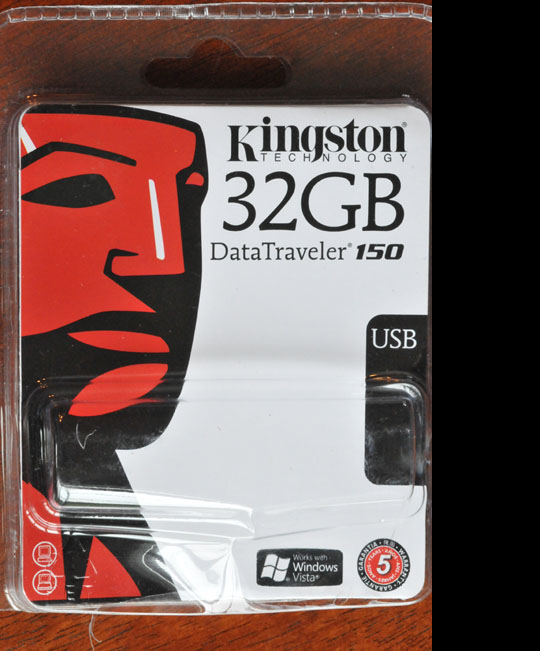
Front of package looks pretty legit
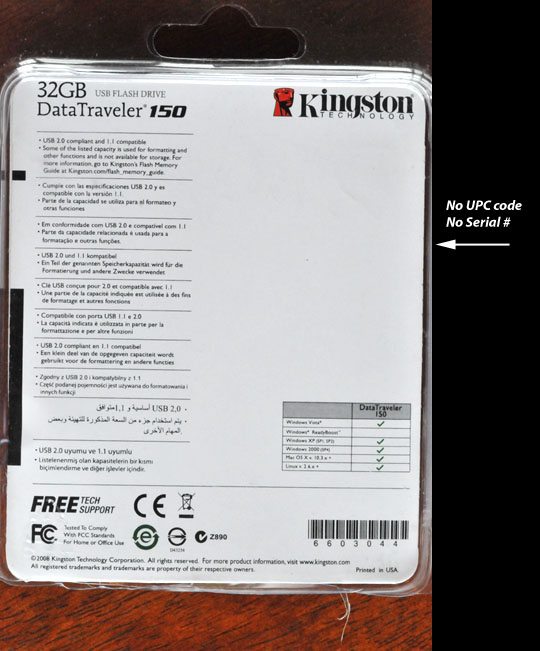
Back of packaging has lots of clues to being a fake
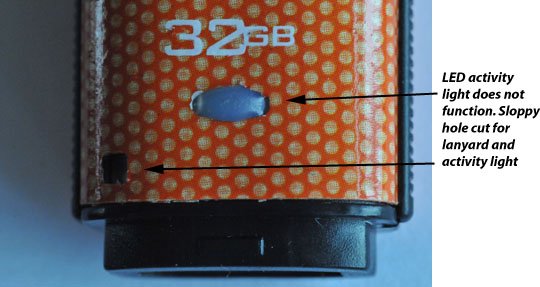
LED was not working.
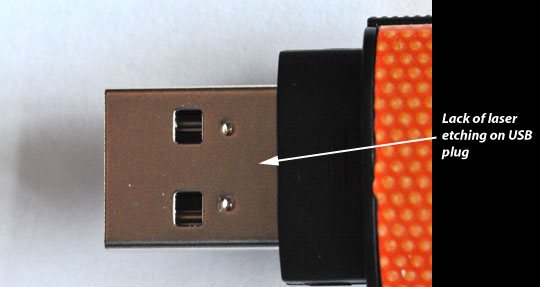
No laser etching of capacity or serial number on USB plug
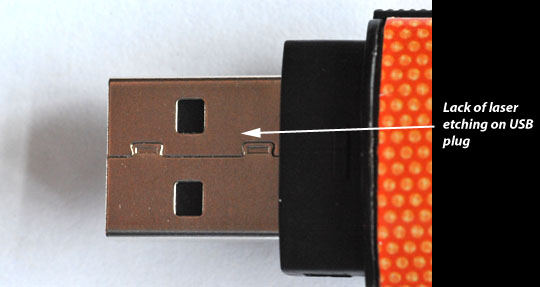
No laser etching of capacity or serial number on USB plug
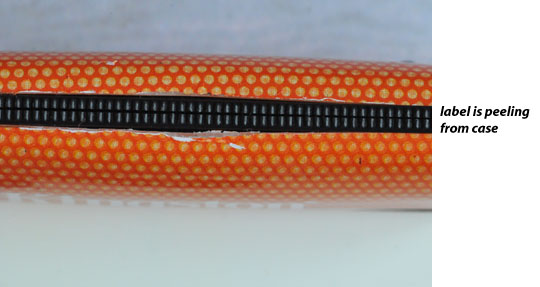
Paper label is peeling from case
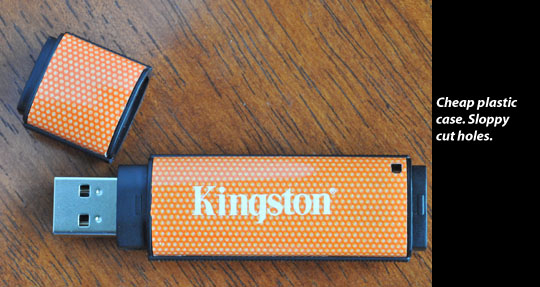
Just doesn't look quite right and feels cheesy
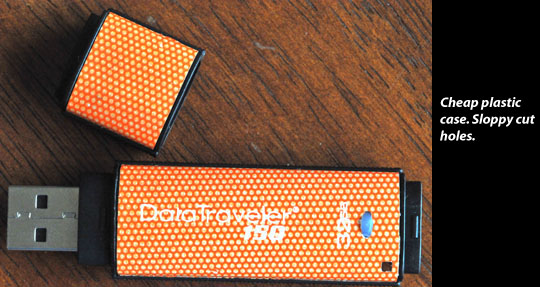
Just doesn't look quite right and feels cheesy
Counterfeit, Fake USB Flash Drives on eBay
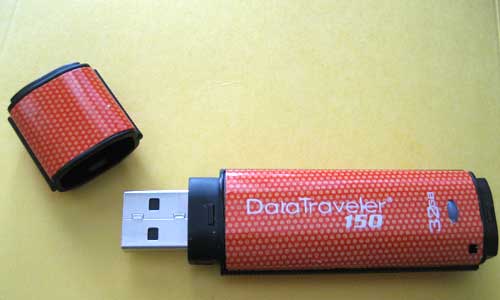
Counterfeit Kingston Flash Drive
The program will provide output such as this…
The media is likely to be defective.

235.9 MByte OK (483200 sectors)

31.0 GByte DATA LOST (65020032 sectors)

Details:4.3 GByte overwritten (9074784 sectors)

0 KByte slightly changed (< 8 bit/sector, 0 sectors)
26.6 GByte corrupted (55945248 sectors)
3 KByte aliased memory (6 sectors)
First error at offset: 0x000000000ebf0000
Expected: 0x000000000ebf0000
Found: 0x00000000aa55aa55
H2testw version 1.3
Writing speed: 9.05 MByte/s
Reading speed: 7.66 MByte/s
H2testw v1.4
You can see from the program output that my "32GB" flash drive is in fact a 256MB chip that has been falsified to indicate 32GB capacity. What happens when you use the drive is that any files put on the drive that exceed the 256MB limit, are not really on the drive and could result in massive loss of data if you were to believe that you actually had a 32GB flash drive.
The other telltale signs of it being counterfeit were as follows...
- The case was really flimsy feeling and when squeezed moderately, creaked and felt like it was going to crush easily
- There was no laser etching identification on the USB plug. Of course, there would be no way to check this unless you could examine the flash drive before purchase, which of course is not possible when buying from an eBay merchant.
- The LED activity light was non-functioning.
- The blister-pack packaging did not have a real UPC code, serial number or any other "official" signs of authenticity.
I immediately filed a dispute and escalated it immediately to a claim with PayPal. This incident also points out how much safer it is to use a real Credit Card when making purchases. Using a Credit Card makes the process of disputing a charge so much easier then going through the hoops that PayPal makes you go through.
If you are considering buying a flash drive on eBay because the prices are too good to be true, think again. I'd venture to guess that the vast majority of Kingston flash drives being offered on eBay right now are fakes.
Here are some other sites to visit to learn more about counterfeit flash drives being sold on eBay...
- http://sosfakeflash.wordpress.com/
- http://reviews.ebay.com/BEWARE-of-FAKE-16GB-32GB-64GB-USB-Flash-Drives-on-eBay_W0QQugidZ10000000001236200
Here is what the packaging looked like for the drive I bought...
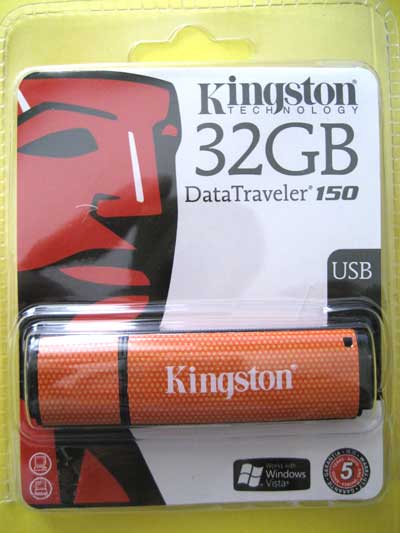
Counterfeit Kingston DataTraveler 150 32GB flash drive-Front
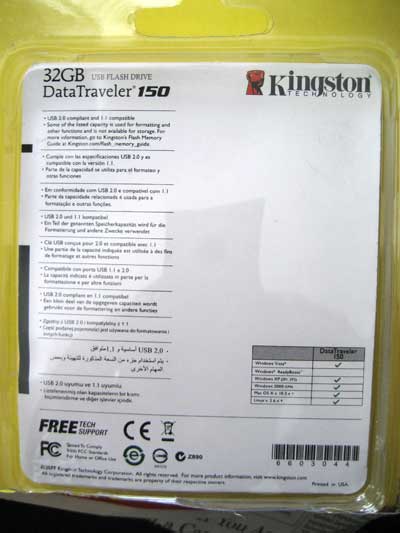
Counterfeit Kingston DataTraveler 150 32GB flash drive-Back
Kingston 32BG DataTraveler 150 Flash Drive
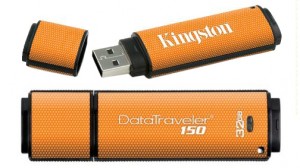
Kingston 32GB DataTraveler 150 Flash Drive
The bottom line is that you get what you pay for usually and this drive is cheaply constructed and the one I purchased was defectivecounterfeit. The LCD activity light did not operate in the unit I purchased. The plastic casing is extremely flimsy and actually creaks if you squeeze the case. In fact, the case is so flimsy that it feels like I could easily crack the case if I pressed it with a moderate amount of force. If you were to drop the flash drive and accidentally step on it, I think it would definitely crack the case wide open.
The good news is that the flash drive worked (other than the LCD activity light) on both my Mac and PC laptop. It also seems to be compatible with the Numark DDS80.
I cannot recommend the Kingston 32GB DataTraveler 150 because of it’s cheap construction and dubious quality. . Because the item I had the misfortune of receiving was conterfeit, I can’t comment reliably as to the quality, performance or reliability of the legitimate Kingston flash drive. A much better choice would be the 32GB Patriot XplorerXT that I will be reviewing soon.